New in Pulse: where every community ranks on Google, every week
Where does each community show up when someone searches for an apartment? Until now, answering that meant a separate rank tracker and a spreadsheet. It is now on every community’s Search & AI tab in Jamesday Marketing Pulse, updated every Monday.
A client asked us for this directly: they wanted to see which searches their communities rank for, and whether that is getting better. So we built it, and built it to answer three questions at a glance.
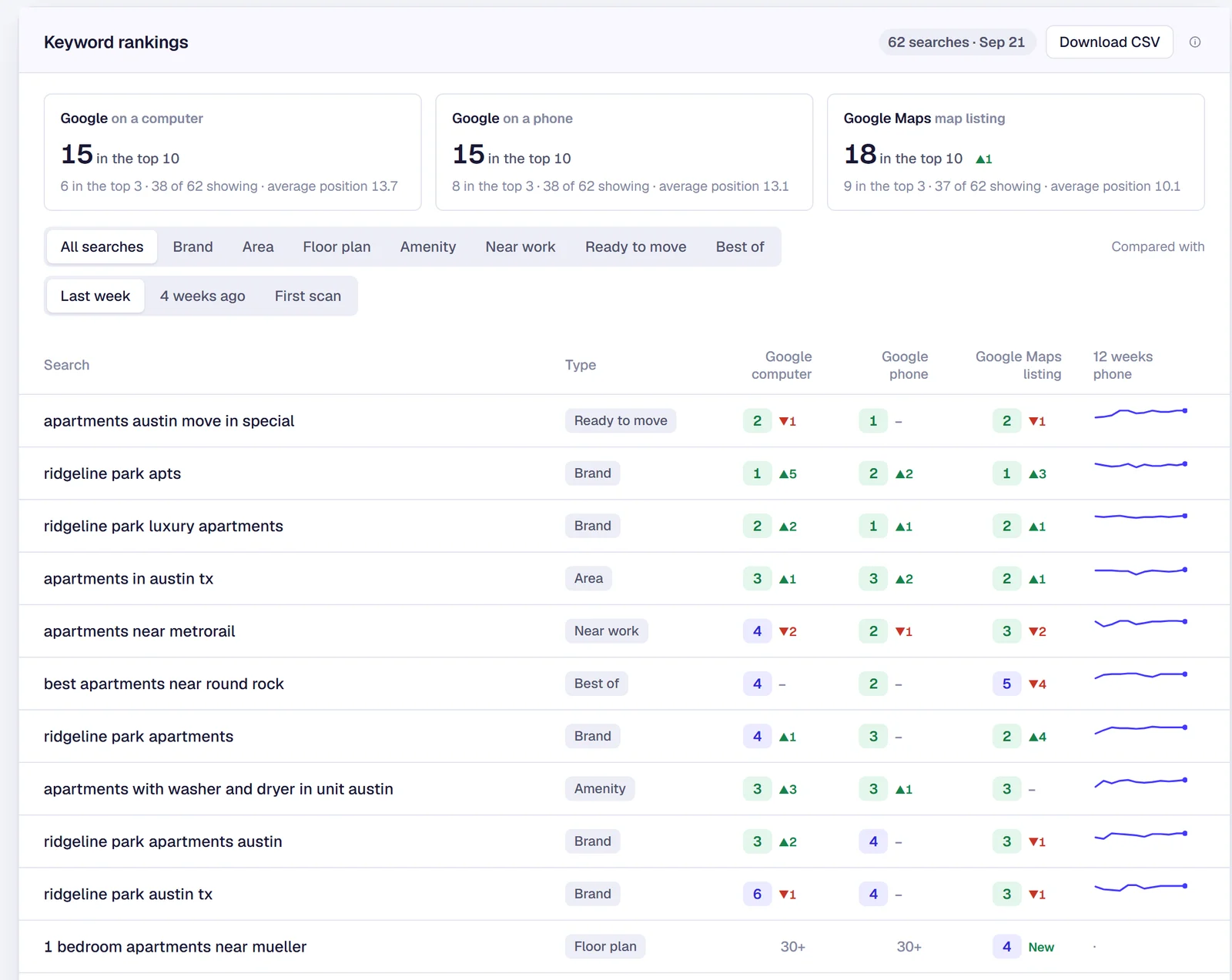
1. Where do we rank, and where?
Every search gets three positions side by side, because they are three different results pages:
The position is your place among Google’s regular results. Ads, the map pack and AI answers are not counted, so a paid listing above you does not make your organic ranking look worse than it is. On Maps we match your listing by its Google Business Profile, so a community with a similar name is never mistaken for yours.
2. Is it getting better?
Each position shows its change: against last week, four weeks ago, or the first scan. Every search has a 12-week trend line, and the cards at the top count how many searches are in the top 10 and top 3 on each of the three, with the average position.
3. Which kind of search are we winning?
Every search is tagged by type: brand, area, floor plan, amenity, near work, ready to move and best of. Filter to one type and the whole report, cards included, follows. A community that ranks first for its own name but is missing from “2 bedroom apartments near downtown” has a different problem than one that is missing from its own name.
Searches that are not in the top 30 anywhere are tucked under a link at the bottom, still checked every week, so the table leads with where you actually show up. And a CSV download gives you every search, every week, all three positions, for your own reporting.
Why it sits next to AI search
The report lives on the same tab as our AI search visibility tracking. Google rankings answer “do we show up when someone searches?” The AI report answers “do ChatGPT, Gemini and Google’s AI answers name us when someone asks?” The fixes overlap, since a website that states the facts clearly helps both, but they move on different schedules, so you want to watch them together.
See it for yourself
The report is live in Jamesday Marketing Pulse. Open it on the demo portfolio, which uses sample communities and sample data, or talk to us about turning it on for your communities.
Questions about keyword rankings
Why is the position different from what I see when I search?+
Google personalizes results by location, device and search history, so no two people see exactly the same page. We check from the community’s own address with a clean browser every Monday, which gives you a number you can compare week to week. We also count only Google’s regular results, not ads, the map pack or AI answers, so the number is not pushed down by paid placements.
Which searches do you track?+
Each community gets its own list, usually 40 to 60 searches: its name, its city and neighborhoods, floor plans, amenities, nearby employers and move-in specials, the way people actually search. You can ask us to add or swap any search at any time.
Does this replace the AI visibility report?+
No, it sits next to it on the same tab. Google rankings tell you whether you show up when someone searches. The AI report tells you whether ChatGPT, Gemini and Google’s AI answers name you when someone asks. They move for different reasons, so we track both.
Want to see where your communities rank?
Bring a community. We will show you where it ranks on Google, on a phone and in Maps, and whether AI assistants name it.
The person on this call is the person in your ads account. Cameron Day, owner.