Google Ads for apartments: a campaign setup that counts tours, not clicks
Most apartment ad accounts are judged on clicks because clicks are easy to count. A setup built to count tours, calls that last and applications spends differently, and it tells you what a lease actually costs.
Google Ads for apartments works when the account is built around one question: did this dollar produce a renter who toured or applied? Everything else, from campaign names to bidding, follows from that. This guide walks through the setup we use for every community we manage, in the order we build it: tracking first, then campaigns, then targeting, copy and budget, then the weekly checks that keep it honest.
Step one: decide what counts as a lead
Before a single campaign goes live, the account needs to know what success looks like. Google bids toward whatever you tell it is a conversion. If a page view or a click on the phone number counts, the account will find you cheap page views and accidental taps, and the report will look great while the leasing office stays quiet.
We count three things, and only these three, as primary conversions:
- Tours booked. From the scheduling tool on the website, confirmed by the tour actually being created, not by someone opening the calendar.
- Calls that last a minute or more. Google lets you count calls longer than a minimum duration you set. We set it to 60 seconds, which filters out hang-ups, wrong numbers and AI greetings that end before a conversation starts.
- Applications started. The strongest signal a website can send short of a signed lease.
Contact forms, chat opens and brochure downloads can stay in the account as secondary actions so you can see them, but they should not steer bidding. Then join the result to signed leases from the property management system, by source, so the account is graded on what the owner cares about. That join is what our cost per lease reporting does for every community.
Google Ads for apartments: the four campaigns every community needs
Templates are where most apartment accounts go wrong, so the names below are a structure, not a keyword list. What goes inside each one comes from that community’s own search demand, comp set and floor plans.
1. Brand: searches for your community’s name
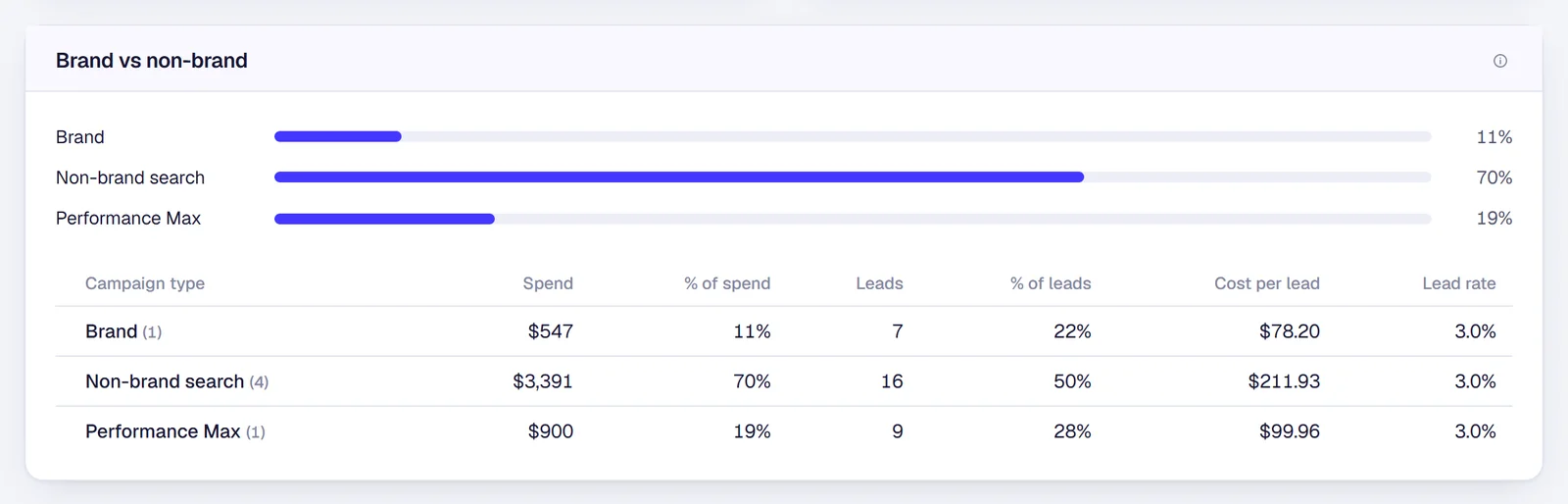
Its own campaign, its own budget, always on. Brand searches are the cheapest leads in the account, and listing sites and nearby communities bid on your name if you do not. Keeping brand separate also keeps it from hiding inside the other campaigns’ numbers, where it makes everything look cheaper than it is.
2. Near me and submarket searches
“Apartments near me,” “apartments in [neighborhood],” “apartments near [employer or campus].” This is the renter who knows the area and not yet the community, and it is usually the largest share of non-brand spend. Pair it with location assets so the ad can appear on Google Maps, where a lot of “near me” searching actually happens. Google confirms that with location assets, your locations can appear on Google Maps, including the Maps app, which requires a linked Google Business Profile.
3. Floor plan and amenity searches
“2 bedroom apartments [city],” “pet friendly apartments with a garage.” Build these around the homes that need leasing, not the whole rent roll. If 3 bedrooms are full and 1 bedrooms are sitting, the 1 bedroom ad group gets the budget and sends renters straight to that floor plan, not the homepage.
4. Performance Max and remarketing, with your name excluded
Performance Max is Google’s automated campaign type that runs across Search, Maps, YouTube and display. It can find renters the other campaigns miss, but left alone it also serves on your community’s name and reports those leads as its own. Apply a brand exclusion, limit its goals to the three conversions above, and grade it only on what it found outside your name. Ads to past site visitors, the renter who looked and did not book, belong here too, and they are often the cheapest tour in the account.
Targeting rules for housing ads
Apartment ads fall under Google’s housing policy. In the United States and Canada, housing ads cannot target audiences by gender, age, parental status, marital status or ZIP code. City and radius targeting are allowed, with a radius of at least 1 km. In practice that means:
- Target by city, county or a radius around the community, sized to how far renters actually commute, not by a list of ZIP codes.
- Let the search itself do the qualifying. Someone searching “2 bedroom near the medical center” has already told you what they want.
- Write copy about the homes, the location and the price, never about who should live there. Fair Housing review belongs on every headline, not just the ones that feel risky.
Ad copy: prices and specials, the same day they change
A renter who clicks an ad promising six weeks free and lands on a page with no special does not book a tour. Neither does one who sees last month’s starting price. The headline with your price and the headline with your special should match the website every day. We built that into Pulse: it reads each community’s website every afternoon and updates the price and special headlines right after. Here is how that works.
Beyond price and special, the strongest headlines name the location the renter searched, the floor plan they asked for, and a clear next step: tour today, see availability, apply online.
How much should an apartment community spend on Google Ads?
Work backward from leases, not forward from a percentage of a marketing budget. The arithmetic takes three numbers: the leases you need this month, your lead-to-lease rate, and what a qualified lead costs you today.
A worked example
Using the figures from our case study, $29 per qualified lead, and the industry lead-to-lease rate of 15.44% from REACH by RentCafe’s study of 1,533 multifamily websites:
| Step | Math | Result |
|---|---|---|
| Leases needed this month | Stabilized community, normal move-outs | 4 |
| Qualified leads needed | 4 ÷ 0.1544 | about 26 |
| Monthly ad budget | 26 × $29 | about $754 |
| Daily ad budget | $754 ÷ 30.4 days | about $25 a day |
| Cost per lease | $754 ÷ 4 | about $188 |
Swipe sideways to see the full table →
Ad spend only, before any management fee. Your own cost per lead and lead-to-lease rate will differ by market, price point and how the account is built. Use yours.
Run the same math in reverse and the common question answers itself. Is $10 a day enough? At $29 a lead, $10 a day is about 10 leads a month, or one or two leases. That keeps brand covered and little else. A lease-up with dozens of vacant homes needs several times the stabilized budget, because every week of vacancy costs real rent. Our cost per lease calculator does this with your own numbers, with and without agency fees, and the lease-up vs. stabilized guide covers how the structure changes as occupancy climbs.
The weekly checklist we run on every apartment account
Setup is a day. Keeping it honest is every week. This is the list we work through for each community:
- Is tracking still firing? Tours, calls and applications all recorded in the last seven days. A website update that removes a tag looks exactly like a slow week.
- Search terms report. Read the actual searches that spent money. Anything that will never become a tour, such as other communities’ names, homes for sale or job listings, becomes a negative keyword.
- Brand stays out of Performance Max. Confirm the exclusion is still applied and brand leads are still landing in the brand campaign.
- Lost to budget or lost to rank. Impression share lost to budget means more money would help. Lost to rank means better ads and landing pages will, and more money only buys the same problem faster.
- Prices and specials match the website. Every headline that names a number gets checked against the live site.
- Budget pacing against leases needed. On pace to spend the month’s budget, and that budget still matches the vacancy in front of you.
- Cost per lead by campaign. Brand, non-brand and Performance Max side by side. If one campaign’s cost per lead moves sharply, find out why before changing bids.
Every one of those checks is visible per community in Jamesday Marketing Pulse, refreshed every 30 minutes, so the regional manager sees what we see.
Are Google Ads still worth it for apartments?
For most communities, yes, for one reason: search reaches the renter who is already looking. A listing site reaches renters comparing every community in the market at once. Search sends the renter who typed your neighborhood, your floor plan or your name to the one website where the only community to tour is yours. On our case study portfolio that works out to roughly $188 per lease, against a $588 industry average across all sources (REACH by RentCafe). If you want to see how that compares channel by channel, read ILS vs. Google Ads.
The short version
Count tours, calls over a minute and applications, and nothing else. Give brand its own campaign and keep it out of Performance Max. Build the rest from the community’s own searches and the homes that need leasing. Target by place, never by person. Keep prices and specials current. Set the budget from leases needed, then check all of it every week. If you would rather have someone senior do that for you, that is our multifamily Google Ads management, part of our multifamily PPC service, month-to-month in accounts you own.
Questions about Google Ads for apartments
Is $10 a day enough for Google Ads for an apartment community?+
It can be enough to keep a brand campaign running, so renters who search your community by name land on your site and not a listing page. It is rarely enough for non-brand search. At our case study’s $29 per qualified lead, $10 a day buys about 10 leads a month, which is one or two leases at the industry lead-to-lease rate. Work backward from the leases you need instead of starting from a daily number.
Can apartment ads show on Google Maps?+
Yes. Link the community’s Google Business Profile to the ad account and add location assets, and Google can show the ad beside, above or below results in Google Maps, including the Maps app. It matters most for “near me” searches, where renters often open Maps before they open a website.
Can we target apartment ads by age or ZIP code?+
No. Google treats apartment ads as housing ads, and in the United States and Canada they cannot be targeted by gender, age, parental status, marital status or ZIP code. City, county and radius targeting are allowed, with a radius of at least 1 km. The keywords, the ad copy and the landing page do the work instead.
Should Performance Max run for apartments?+
Often, but only with your community’s name excluded and with tours and applications as the only goals it is allowed to chase. Without the brand exclusion, Performance Max serves on searches for your own name, claims those leads, and looks far better than it is.
Are Google Ads still worth it for apartments in 2026?+
For most communities, yes, because search reaches renters who are already looking. The test is cost per signed lease, not clicks. Our case study portfolio runs at roughly $188 per lease, against a $588 industry average across all sources (REACH by RentCafe).
Want this setup checked on your own account?
Bring one community’s Google Ads account. We will show you what it counts as a lead today, where brand spend is hiding, and what we would change in the first 30 days.
The person on this call is the person in your ads account. Cameron Day, owner.