Advertising apartments for rent: where each dollar goes in 2026
Every channel claims the lease. The useful question is which renter each one reaches, what it is good for, and what a signed lease from it actually costs.
Advertising apartments for rent used to mean a listing package and a banner on the building. In 2026 a renter might start on Google, open Maps, scroll past a Facebook ad, check a listing site, and ask ChatGPT which communities nearby allow dogs, all before the first call. This guide goes channel by channel through where a community’s advertising dollars go, what each channel is actually good for, and how we measure each one so the budget follows leases instead of habit. It is written for operators and regional managers running professionally managed communities, not for a single rental unit.
Start with what every channel sends renters to
Before any money goes out, check the two places every ad ends up: the property website and the Google Business Profile. A renter who clicks an ad and finds last month’s price, a special that ended, or a floor plan with no availability does not book a tour, and you paid for the click anyway. We check four things first:
- Prices and specials on the website match the ads. Every day, not every quarter.
- Tours, calls and applications are tracked. If the website cannot tell you which channel sent a tour, no channel can be judged.
- The Business Profile is complete and current. Hours, phone number, photos and the website link, because Maps and many AI answers read it directly.
- Lead response is fast. Paid traffic into a leasing line that goes to voicemail is the most expensive advertising there is.
The channels, one by one
1. Google search ads: the renter who is already looking
Search is capture. Someone typing your neighborhood, a floor plan, “apartments near me” or your community’s name has already told you what they want. The ad sends them to your website, where the only community to tour is yours, and the budget can move the same day occupancy does. For most communities this is the first paid dollar and the largest share of the budget. Give your own name its own campaign so listing sites and neighbors cannot buy the renter who searched for you. The setup we use, from tracking to the four core campaigns, is in our Google Ads for apartments guide.
2. Google Maps and the Business Profile: the “near me” renter
A lot of local apartment searching happens in Maps, not on a results page. The organic listing is free and depends on a complete, active Google Business Profile: accurate details, weekly posts, current photos and replies to reviews. On the paid side, linking the profile to your ad account lets Google show your locations on Google Maps, including the Maps app. Of all the channels here, this one costs the least to keep in shape and is the easiest to neglect.
3. Listing sites: the renter comparing the whole market
Apartments.com, Zillow and the other listing sites are marketplaces. The renter arrives knowing the market and the budget and sees every paying community side by side. You usually pay a flat monthly package whether it brings two leads or two hundred. Listing sites earn their fee when nobody knows your name yet, in a lease-up or in a market where renters start there by default. They are weakest for a stabilized community replacing normal turnover. We cover how to run both without paying twice for the same renter in ILS vs. Google Ads.
4. Facebook and Instagram: the renter who is not searching yet
Meta is demand creation. It reaches people before they search, which makes it useful for a lease-up, a new special, or bringing back renters who visited your website and did not book. It runs under Meta’s housing rules: no targeting by age, gender or interests, and a wide minimum radius. That puts the work on the creative, the offer and the page it lands on, so we test new ads every week and judge them next to Google on the same screen. More on how we run it on our Meta ads for apartments page.
5. AI answers: the renter who asks instead of searching
ChatGPT, Google AI Overviews and similar assistants now answer questions like “which apartments near downtown allow two dogs.” You cannot buy your way into most of those answers. They are built from your website, your Business Profile, reviews and the listing sites, which is one more reason the information has to match everywhere. When it does not, the assistant repeats whichever source is stale; we walk through that problem in why your community shows the wrong rent in ChatGPT. Checking what the assistants say about each community is part of our AI search visibility work.
6. Performance Max, YouTube and display: reach with a leash
Google’s automated campaigns can find renters the search campaigns miss across YouTube, display and Gmail. Left alone, they also serve on your own community’s name and report those leads as their own. Run them with your name excluded and with tours, calls of a minute or more, and applications as the only goals they are allowed to chase.
7. The property itself
Signage, banners and resident referrals are not glamorous, and they do not show up in an ad dashboard. They do create the brand searches that make every channel above cheaper. Ask every renter how they heard about you and record it, so the property shows up in the numbers too.
What each channel is good for, side by side
| Channel | Best at | Lean in when | Measure by |
|---|---|---|---|
| Google search | Renters already looking | Always; most of the paid budget | Tours, calls of 60 seconds or more, applications, then leases |
| Maps and Business Profile | “Near me” and name searches | Always; low cost | Calls, direction requests, website clicks |
| Listing sites | Renters comparing the market | Lease-up, or markets where renters start there | Signed leases by source against the package cost |
| Facebook and Instagram | Renters not searching yet | Lease-up, new specials, past site visitors | Tours and leads, judged next to Google |
| AI answers | Renters asking questions | Always; mostly fixed by accurate information | What assistants say about the community, checked regularly |
| Performance Max and YouTube | Reach beyond search | Once search is covered, with your name excluded | Leads found outside your own name |
Swipe sideways to see the full table →
How to split the budget: lease-up vs. stabilized
The mix should follow occupancy, not the contract year. A lease-up has dozens of homes to fill and no name recognition, so it leans on listing sites and Meta to create awareness, with search capturing the renters that awareness produces and a brand campaign from the day the community has a name. A stabilized community needs a handful of leases a month to replace move-outs, so the budget narrows to brand, the searches that already convert, Maps and ads to past site visitors. The listing package steps down at renewal. Our lease-up vs. stabilized guide covers how the ad account itself changes as occupancy climbs.
A worked example: setting a monthly ad budget
Start from leases, not from a percentage of last year’s budget. Using the $29 per qualified lead from our case study and the 15.44% industry lead-to-lease rate:
| Step | Math | Result |
|---|---|---|
| Leases needed this month | Community with real vacancy | 10 |
| Qualified leads needed | 10 ÷ 0.1544 | about 65 |
| Monthly ad spend | 65 × $29 | about $1,885 |
| Daily ad spend | $1,885 ÷ 30.4 days | about $62 a day |
| Cost per lease | $1,885 ÷ 10 | about $189 |
Swipe sideways to see the full table →
Ad spend only, before any management fee or listing package. Your own cost per lead and lead-to-lease rate will differ by market, price point and channel. Use yours.
Compare that with the $588 industry average cost per lease across all sources, covered in our cost per lease guide, and you can see why the first dollars go where renters are already looking. Run your own numbers in the cost per lease calculator.
How to measure advertising apartments for rent in leases
Cost per click and cost per lead flatter the channels that produce the most volume. The number that settles budget arguments is cost per signed lease, by source. To get it:
- Count the same things everywhere. Tours booked, calls that last 60 seconds or more, and applications. Page views and chat opens can be visible, but they should not steer spend.
- Tag every link and every phone number by channel, so the website and the leasing office can tell where a renter came from.
- Join leads to signed leases from the property management system, by source, every month.
- Include the full cost: ad spend, management fees and listing packages, divided by the leases each channel produced.
- Move budget, not vendors. When one channel’s cost per lease climbs, shift dollars to the one that is working this month.
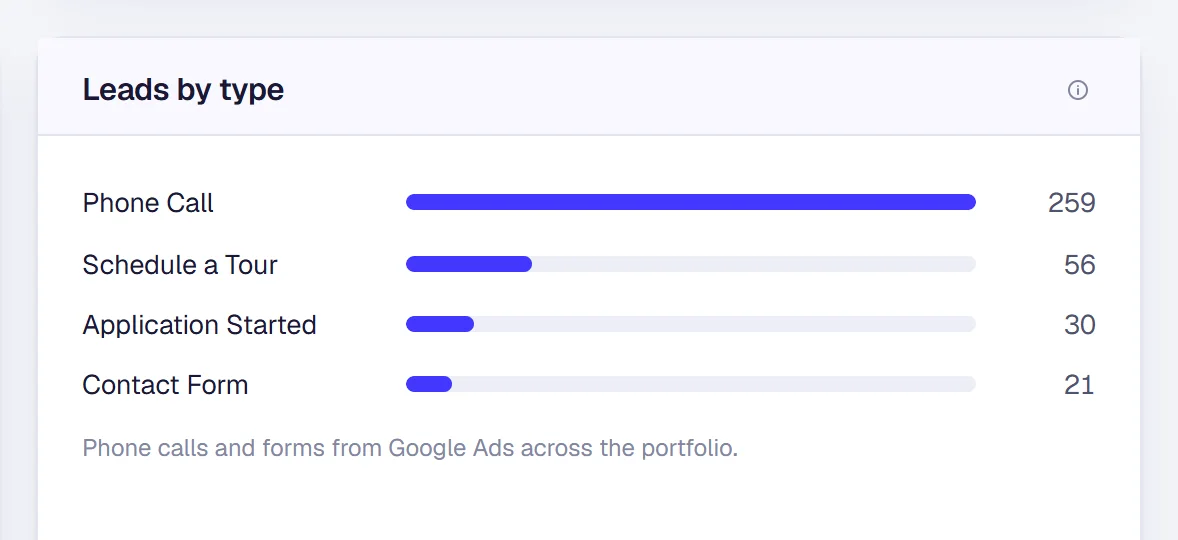
That join is what our cost per lease reporting does for every community we manage, and it is how our multifamily paid advertising budgets get set each month.
The short version
Fix the website and the Business Profile first. Put the first paid dollars into Google search, with your own name in its own campaign. Add listing sites and Meta when you need renters who do not know you yet, and step them down once you do not. Keep your information accurate everywhere AI assistants read. Then judge every channel by the same number: what a signed lease from it cost.
Questions about advertising apartments for rent
Where is the best place to advertise apartments for rent?+
There is no single best place, because each channel reaches a different renter. Google search captures renters already looking for your area, floor plan or name. Listing sites reach renters comparing the whole market. Meta reaches people who are not searching yet. Start with your own website and Google Business Profile, add Google search, then add the rest where your own cost per lease says they earn it.
How do you advertise an apartment for rent for free?+
The free channels are the ones you own: a property website with current prices and availability, a complete Google Business Profile with weekly posts and replies to reviews, accurate information everywhere AI assistants read, and signage at the property. None of them replaces paid search for a community with real vacancy, but every paid channel performs better when these are right.
How much should an apartment community spend on advertising?+
Work backward from the leases you need. Divide leases needed by your lead-to-lease rate to get the leads you need, then multiply by what a qualified lead costs you. At the $29 per qualified lead in our case study and the 15.44% industry lead-to-lease rate, 10 leases a month takes about 65 leads and about $1,885 in ad spend. Use your own numbers in the cost per lease calculator.
What are the fair housing rules for apartment ads?+
Google and Meta both treat apartment ads as housing ads. Google does not allow targeting by gender, age, parental status, marital status or ZIP code for housing ads in the United States and Canada. Meta removes age, gender and interest targeting and requires a wide location radius. On every channel, write about the homes, the location and the price, never about who should live there.
Want to see where your advertising dollars go?
Bring one community’s numbers. We will show you which channels are producing tours and leases today, and where we would move the budget in the first 30 days.
The person on this call is the person in your ads account. Cameron Day, owner.